
The Glyph Matrix Interface
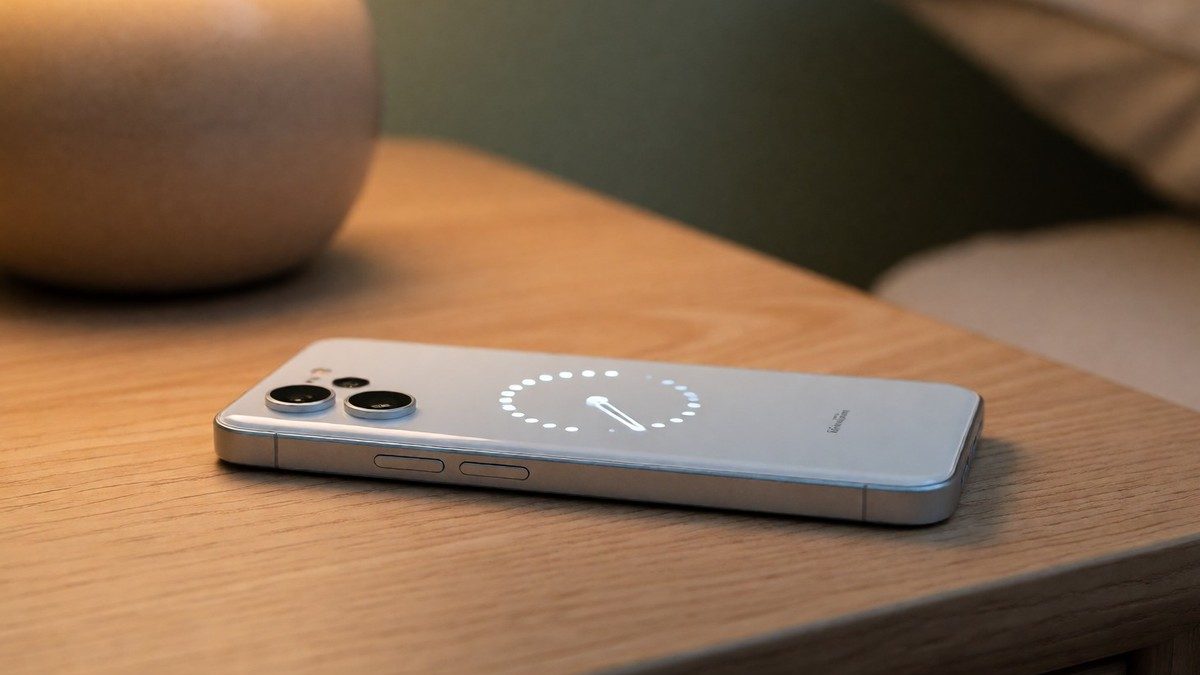
The 489 micro LEDs in the Glyph Matrix replace the older LED strips on the back of the Nothing Phone (3), creating a secondary screen that provides information through animations and supports nine Glyph Toys. You use the circular capacitive Glyph Matrix button to cycle through options with one press and start a tool with a long press. These tools include a Digital clock, Battery indicator, Solar clock, Rock paper scissors, Magic 8 Ball, Spin the bottle, Leveller, and a Stopwatch. The stopwatch is frustratingly designed because you must long-press the button to both start and stop the timer. The Glyph mirror uses the 50 MP rear camera as a viewfinder. Flip to Glyph activates silent mode and shows notifications when you place the device face down. Essential Notifications let you create custom rules so the Matrix only lights up for specific contacts or keywords. You can even narrow these rules down to trigger animations only for specific keywords. The system also generates ringtones that change based on the caller’s name or number. The device also includes a linear haptic motor that is 14% larger than the motor on the Phone (2) to provide better tactile feedback. To use these options, you navigate to Settings then Glyph Interface to enable the toggles for Glyph Toys and Volume indicator.
Software and Customization Rivalry
Nothing OS 5.0 delivers a minimalist alternative to Samsung One UI 7. Samsung provides features like a side-bar, custom fonts, and Samsung Notes, whereas Nothing relies heavily on Google applications for messaging, files, and browsing. The Phone (3) received the stable Nothing OS 5.0 update in mid-October 2026, following an open beta that launched for the device in August 2026. You can use the Essential Key to record voice notes or trigger AI-powered meeting transcriptions when the device sits face down. The Essential Apps Builder allows you to create tools by describing them in natural language. The system uses the Geist typeface and provides adaptive color schemes that tint app icons and widgets based on your wallpaper. You can use the Collector app to turn photos into stickers for your home screen. The Away Time widget tracks how long you stay away from your phone. The Smart Collections feature in Essential Space automatically suggests relevant items from your saved content. The system also integrates Model Context Protocol, which allows compatible AI tools to search saved data in Essential Space. If you prefer the vibrant, candy-colored interface of Samsung, you might find the muted Nothing OS design underwhelming. The new Glyph App centralizes all settings, sounds, and schedules for the interface in one place. The Glyph Timer widget also lets you start countdowns directly from your home screen. Can the Glyph Matrix become more useful as developers access the SDK?
Hardware and Core Specifications
The $799 Nothing Phone (3) competes with the Samsung Galaxy S25. The device has a 6.67-inch 1.5K AMOLED display with a 120 Hz refresh rate and Gorilla Glass 7i protection. It uses a Snapdragon 8 Gen 4 processor and a 5,150 mAh battery. The rear camera setup contains three 50 MP lenses, including a periscope telephoto lens with 3x optical zoom and 60x digital zoom. The 50 MP selfie camera replaces the 32 MP sensor on the Phone (2). The device supports 65W wired charging and 15W wireless charging. The 50 MP main camera uses a 1/1.3-inch sensor that is 20% larger than the sensor on the Phone (2) and has an f/1.68 aperture. Its ultra-wide lens provides a 114-degree field of view, while the phone’s IP68 rating protects it against water and dust. Essential search functions as an AI-powered tool that allows you to search for settings, files, or photos using keywords.
| Feature | Nothing Phone (3) Specification |
|---|---|
| Processor | Snapdragon 8 Gen 4 |
| Display | 6.67-inch 1.5K AMOLED |
| Main Camera | 50 MP (1/1.3-inch sensor) |
| Telephoto Camera | 50 MP (3x optical zoom) |
| Selfie Camera | 50 MP |
| Battery | 5,150 mAh |
| Charging | 65W wired / 15W wireless |